Tools
FIRE apps for iPhone: what actually runs on your phone
Search for a FIRE calculator and you will drown in them. Search for one that is an actual iPhone app, the kind you open with a thumb on the sofa, and the list gets short fast. Most of the good planning tools are websites or spreadsheets. That is fine at a desk. It is less fine when the whole point is to check your number in ten seconds. Here is what the iPhone side of the field really looks like, and yes, I build one of the apps in it, so read the last part with that in mind.
Why most FIRE tools are web, not apps
The serious planners, ProjectionLab, Boldin, and the whole spreadsheet tradition, are web first, and there is a good reason. Deep modelling with dozens of inputs is comfortable to build and to use on a big screen: lots of fields, save a scenario, come back and tweak it. That depth is real, and if you enjoy building a model it is worth having. The trade is that it is not something you glance at on your phone in a spare minute. You sit down to it.
| Tool | What it is | Platform | Cross-border | Best for |
|---|---|---|---|---|
| ProjectionLab | Deep model you build yourself | Web | No | Tinkerers at a desk |
| Boldin | Deep US retirement planner | Web | No | US planners staying put |
| Empower | US money dashboard with a calculator | Web and app | No | US account-linkers |
| A spreadsheet | Roll your own | Anywhere | DIY | People who love control |
| Runway | Native FIRE planner | iOS | Yes | A glance on your phone |
Pricing and features change; check each tool's own site for the current picture.
The free iOS apps are mostly US money dashboards
Open the App Store and the well-known free ones are US wealth apps: Empower, and the apps from the big brokerages. They tend to be an account-aggregation dashboard with a retirement calculator bolted on, and they want you to connect your accounts, because that is the business. If you are American and happy linking your banks, they can be useful. As a FIRE planner, especially if you live outside the US, they are thin, and connecting every account is the opposite of the no-login, type-your-own-numbers approach some of us want. Features change, so check any app's current state for yourself.
Native FIRE planners for iPhone are the gap
Put the three things together, a real native iOS app, an actual FIRE planner rather than an aggregator, and one that is not hard-wired to US tax law, and the field almost empties out. That intersection is the gap I built Runway into, so take what follows with the appropriate grain of salt.
Where Runway fits, and where it does not
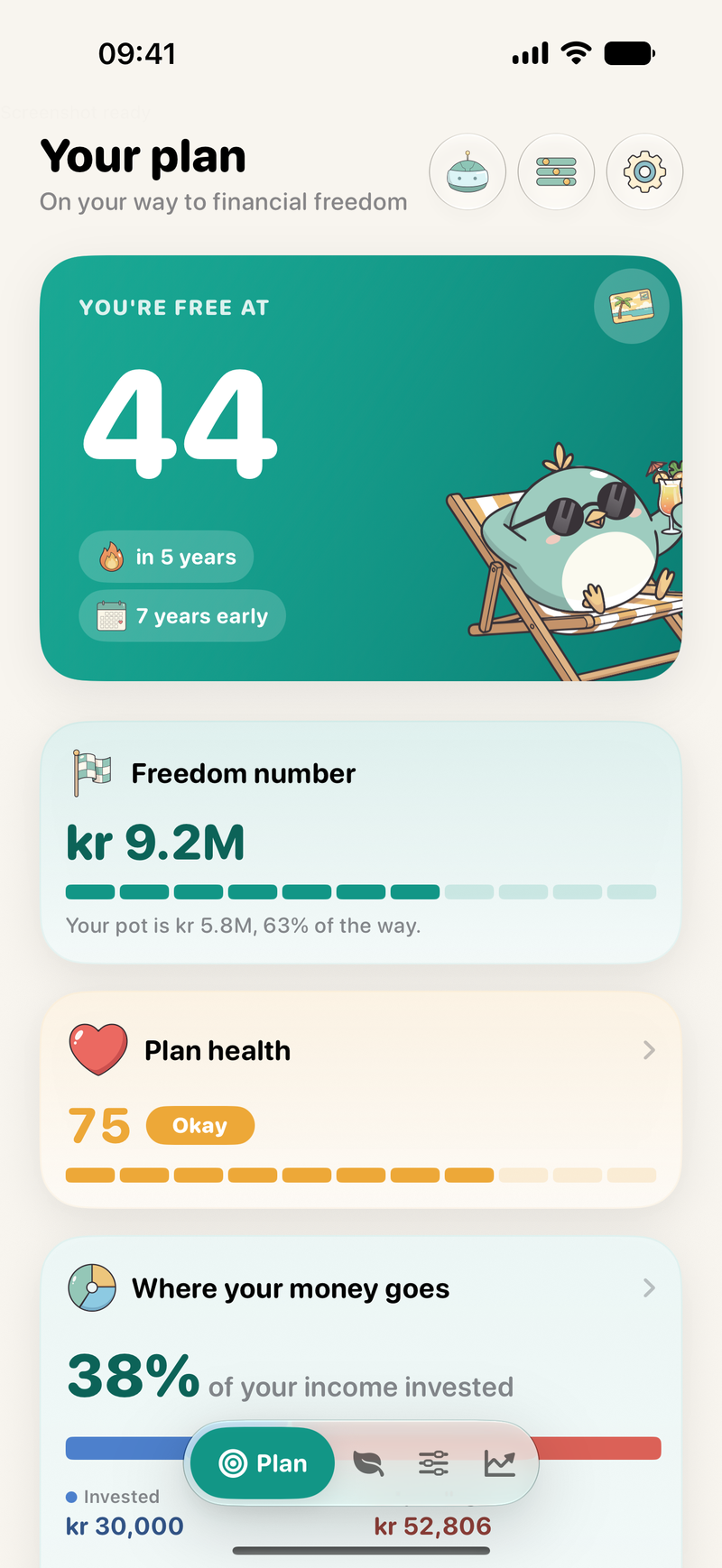
Runway is a native iPhone and iPad app. It runs on your device, with no account and no bank logins, and gives you one number, your freedom age, for free. It is built on the tax rules of where you live rather than US ones (Norway first, more countries coming), and it can price retiring in another country, exit tax included. If that is the shape of your problem, it is worth a look.
Where Runway wins
- A real native iPhone and iPad app, not a website
- Runs on device, no account, no bank logins
- Prices retiring abroad, exit tax included
- Your freedom age is free, forever
Where it falls short
- iOS only, so no web and no Android
- Newer than the web incumbents
- Deepest tax detail is Norway for now
- You type your own figures, no account-linking
So, app or spreadsheet?
The number you check often is the number that actually changes what you do.
Honestly, if you love a spreadsheet and you open it, keep it. The case for an app was never about raw power. It is about friction. The number you check often is the number that actually changes what you do, and a spreadsheet that sits unopened for six months is just a file. An app that puts your freedom age on your home screen is a nudge you cannot ignore. Pick the one you will actually use.

A FIRE planner that lives on your phone
Runway is the native iPhone FIRE planner, on-device, no account, cross-border, with your freedom age free forever. It launches on the App Store on 25 August 2026, and the beta is open now.
Runway is the native iPhone FIRE planner, on-device, no account, cross-border, with your freedom age free forever.
Try the beta on TestFlight Download free on the App StoreFrequently asked
Is there a good FIRE app for iPhone?
Fewer than you would expect. Most well-regarded FIRE planners, like ProjectionLab and Boldin, are web apps rather than native iPhone apps, and the popular free iOS apps are mostly US account-aggregation dashboards with a calculator attached. A dedicated FIRE planner built natively for iPhone is rare, which is the gap Runway was built to fill.
What is the best FIRE calculator app for iOS?
It depends what you want. For deep, many-input modelling at a desk, the web tools are stronger. For something you open on your phone to check your number and pull a few levers, a native app wins on friction. Runway is native to iPhone and iPad, works without an account, and handles cross-border retirement, which the US-focused apps do not.
Do I need a FIRE app, or is a spreadsheet fine?
A spreadsheet is fine, and free, if you enjoy maintaining one and you actually open it. The case for an app is not power, it is friction. The number you check often is the number that changes your behaviour, and a spreadsheet that sits unopened for months is not doing its job.
Is there a FIRE app that works outside the US?
This is where most apps fall down, because they assume US accounts and US tax rules. Runway is built the other way around, on the rules of where you live, with Norway native today and more countries coming, and it can price retiring in another country. Outside the US, that matters more than any single feature.
Related reading: which FIRE calculators handle a move abroad, and the FIRE number in Norway.
Written by Dylan, maker of Runway
Italian, in Norway about eight years, building the cross-border FIRE planner that did not exist for someone like me. Runway runs entirely on your iPhone. It is an educational planning tool, not financial or tax advice.
Tools mentioned, for your own look: ProjectionLab, Boldin, and Empower. Platforms and features are theirs and change often; check their own pages for the current picture.